Unicorn
Concept, design and development with AI assistance
A Markdown notebook for Mac and iPhone that formats as you type, reads your text aloud and syncs with Dropbox or Google Drive.
Case study
I wanted a place to write that was entirely mine: no app subscription, no proprietary formats, just notes saved as plain Markdown files I can open with any editor, today or ten years from now.
Context
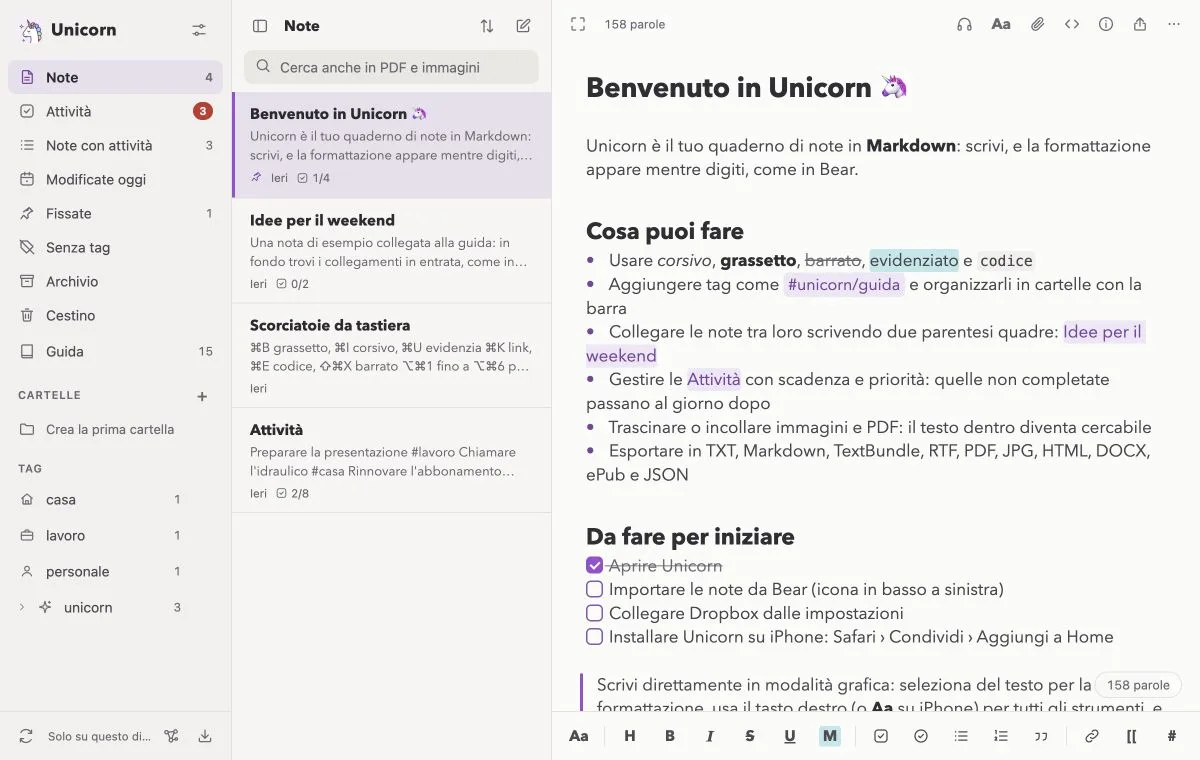
Unicorn is an installable web app that feels like a native app on Mac and iPhone. Formatting appears as you type: Markdown symbols are visible only where the cursor is, leaving the rest of the page clean. It includes editable tables, images and PDFs with searchable text, links between notes with a graph view, nested tags, folders with icons and colours, an archive and a trash folder. Tasks have due dates, priorities and reminders, and appointments can be added to your calendar. When your eyes need a break, Unicorn reads the note aloud using the device’s Italian voices, highlighting the current sentence and letting you choose where to resume, the voice and the speed. Word and character goals help you keep a text to length. The Polvere di stelle mode hides the interface, focuses on a sentence or paragraph and keeps the current line centred.
Contribution
Keep everything on your device or sync through your own Dropbox or Google Drive. Unicorn accesses only its own folder. When a phone and computer edit the same note at the same time, changes are merged line by line; if the very same line changes, both versions remain visible. Note history lets you restore earlier versions. The app can lock with Face ID or Touch ID, with a backup PIN. A complete .uni2bk backup includes notes, attachments, images, PDFs, uploaded fonts, OCR text, note history, folders and settings. It is a ZIP archive that also contains readable Markdown files, and can be imported to restore the app. Bear backups and TextBundles can be imported with tags, images and dates preserved. Export options include TXT, Markdown, PDF, DOCX and ePub, alongside formatted copying and a copy option prepared for Substack.
Value
The part I spent the most time on is the part you barely notice: shades of grey, contrast, text weight, and typography adjustable in half-point increments. A writing app proves itself after an hour of reading, not a minute-long demo.
Highlights
- Live Markdown formatting and distraction-free writing.
- Device-based Italian read-aloud with sentence highlighting.
- Personal Dropbox or Google Drive sync and note history.
- Complete backups including attachments, versions and settings.
- Bear import, document export and formatted copying for Substack.